

GPT Image 2 vs Nano Banana Pro: Tested on 3 Prompts
GPT Image 2 vs Nano Banana Pro on three real prompts: text accuracy, portrait detail and credit cost, plus what GPT Image 2's three quality tiers are worth.
GPT Image 2 vs Nano Banana Pro comes down to price and style. On our three prompts both models spelled every word correctly, so text did not decide it. GPT Image 2 costs 15 to 20 credits a 2K image against 45 for Nano Banana Pro, and its High tier at 65 credits bought no extra accuracy. Pro followed layouts more literally.
Created: October 10, 2026. Updated: October 10, 2026.
GPT Image 2 vs Nano Banana Pro at a glance
| GPT Image 2 | Nano Banana Pro | |
|---|---|---|
| Maker | OpenAI | |
| 2K text-to-image | 15 / 20 / 65 credits (Standard / Medium / High) | 45 credits |
| 4K text-to-image | 25 / 30 / 120 credits | 90 credits |
| Quality tiers | Standard, Medium, High | None |
| Reference images | 1 | Up to 5 |
| Aspect ratios | 1:1, 2:3, 3:2, 3:4, 4:3, 9:16, 16:9 | Same seven |
| Our test, text accuracy | All words and numbers correct | All words and numbers correct |
| Our test, layout | Added column headings we did not ask for | Followed the row layout we described |
| Our test, speed (2K) | 28 to 89 seconds, depending on tier | 26 to 35 seconds |
The test below explains each row. If you are choosing for a text-heavy job on a budget, start with GPT Image 2 at Medium. If you need a layout to match your description, or several reference photos, try Nano Banana Pro.
How we tested
Three prompts, run at 2K and 3:2 with no reference image. GPT Image 2 ran at Medium on every prompt, and on the first prompt at Standard and High as well. Nano Banana Pro has one setting, so it ran once per prompt. All eight images came straight from GPT-IMG with no retouching. The runs went out in parallel batches, so treat the timings as rough.
Prompt 1: a departure board full of text and numbers
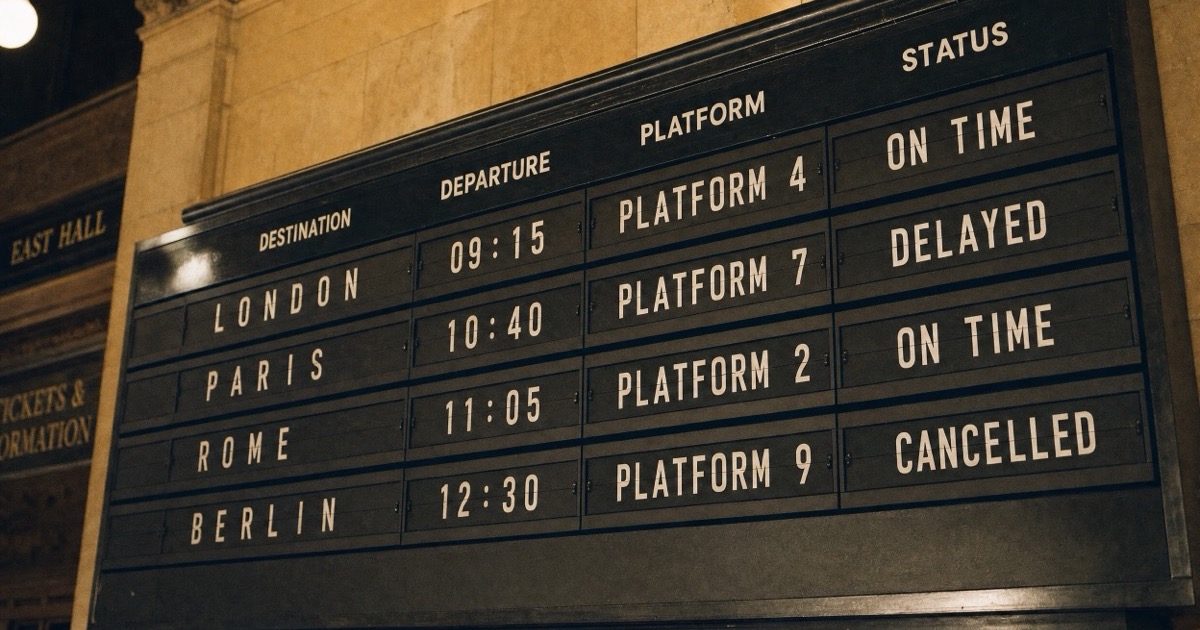
A vintage train station departure board photographed at a slight angle, four rows of white split-flap text on black reading "LONDON 09:15 PLATFORM 4 ON TIME", "PARIS 10:40 PLATFORM 7 DELAYED", "ROME 11:05 PLATFORM 2 ON TIME", "BERLIN 12:30 PLATFORM 9 CANCELLED", warm tungsten light, 35mm photo
GPT Image 2, Medium (20 credits, 37 seconds):
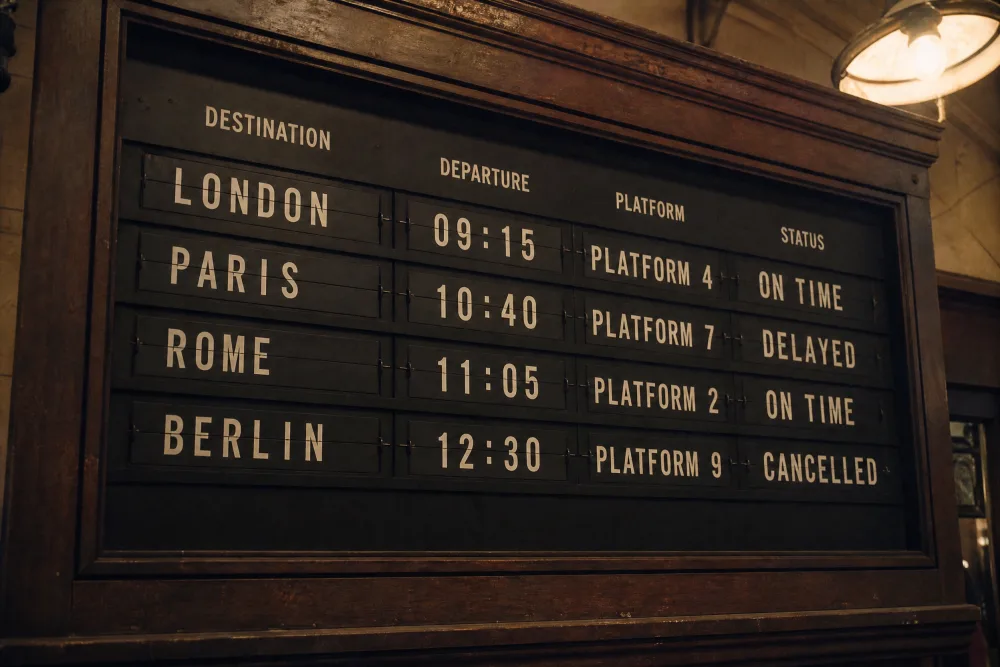
Nano Banana Pro (45 credits, 34.8 seconds):
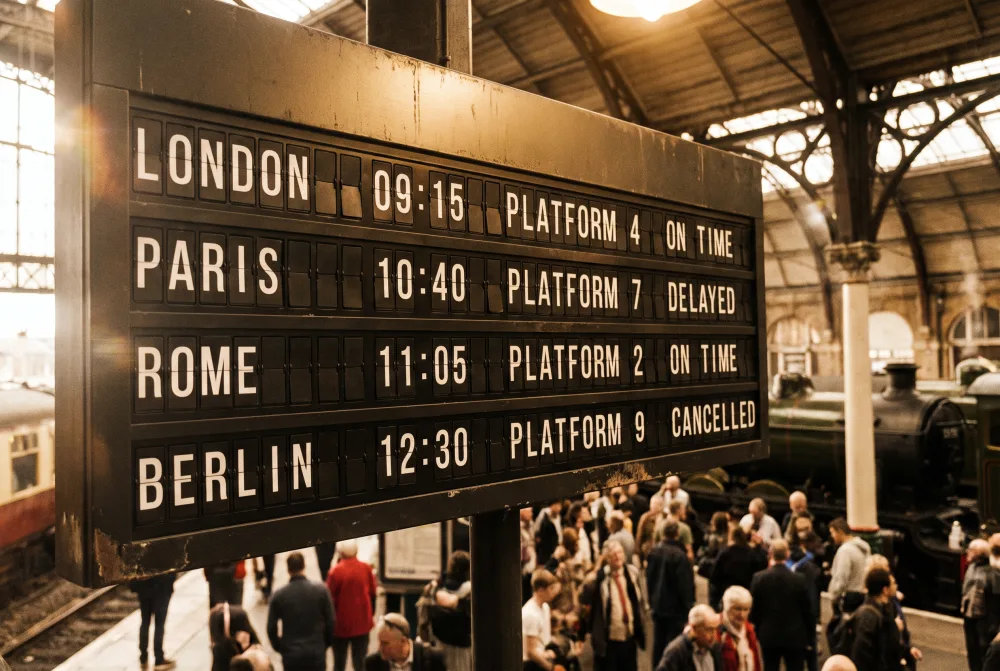
Every city, time, platform number and status is correct on both. That is the result worth noting, because dense text with numbers is where image models used to fail.
The difference is in layout. We described four rows of text. Nano Banana Pro drew four rows, each one a line of split-flap tiles, and added a crowd and a steam train behind the board. GPT Image 2 turned the same text into a table and put column headings above it, "Destination", "Departure", "Platform" and "Status", which are not in the prompt. It did this at all three quality tiers. If you need the output to match your wording exactly, that is a point for Pro. If you want something that reads like a real timetable, the headings may be a bonus.
What the three GPT Image 2 tiers bought
We ran the same prompt at Standard, Medium and High. Costs at 2K are 15, 20 and 65 credits.
Standard (15 credits, 27.7 seconds):
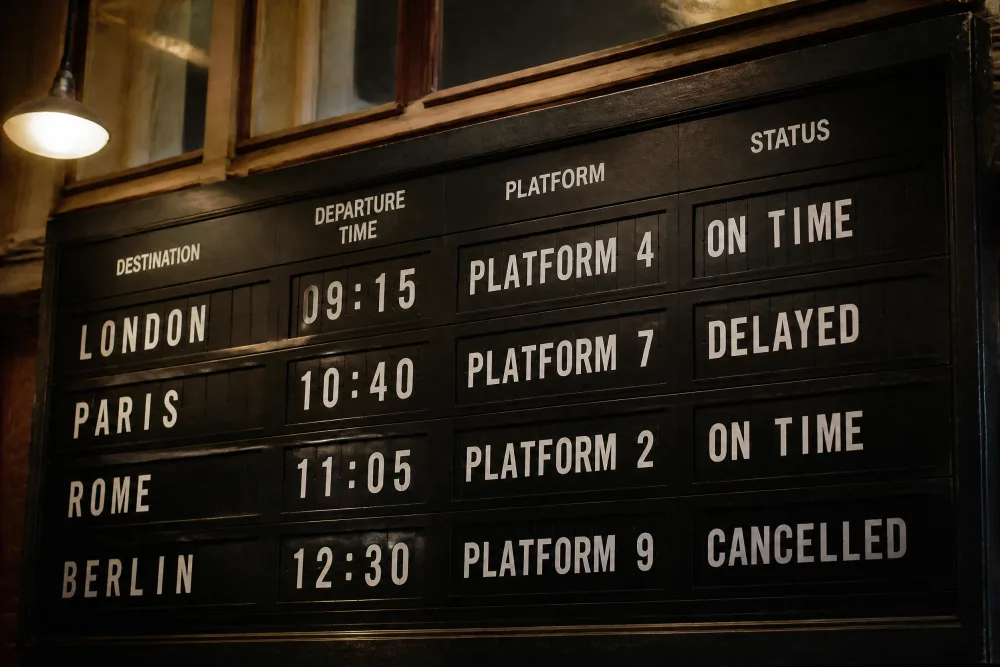
High (65 credits, 89.4 seconds):
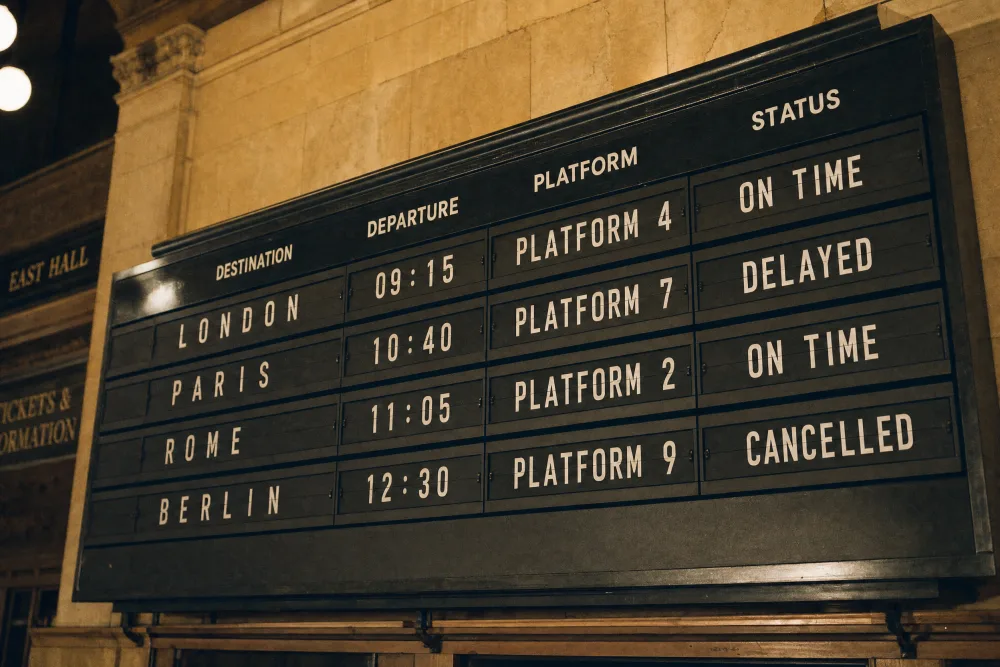
The text was already right at Standard. Going to High did not fix anything, because nothing was broken. What changed was the setting: the board sits in a stone hall with wall signs reading "EAST HALL" and "TICKETS & INFORMATION", neither of which we wrote, and the photo looks more like a real place. The render also took about three times as long.
For this prompt, then, High cost more than four times Standard for a more convincing background. That can be worth it for a hero image. For text accuracy it bought nothing. The sensible habit is to find the wording at Standard, then re-run the one image you will publish at Medium or High.
Prompt 2: a portrait with weathered hands
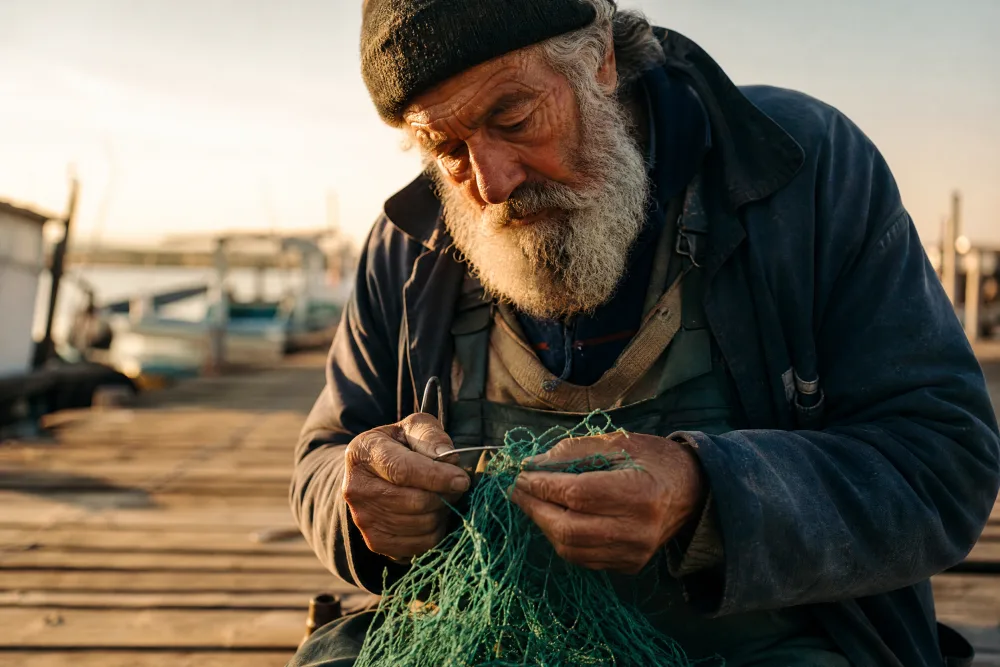
Candid portrait of an elderly fisherman mending a green net on a wooden dock at golden hour, weathered hands in sharp focus, salt in his grey beard, shallow depth of field, 85mm lens
GPT Image 2, Medium (20 credits, 41.8 seconds):
Nano Banana Pro (45 credits, 26.1 seconds):
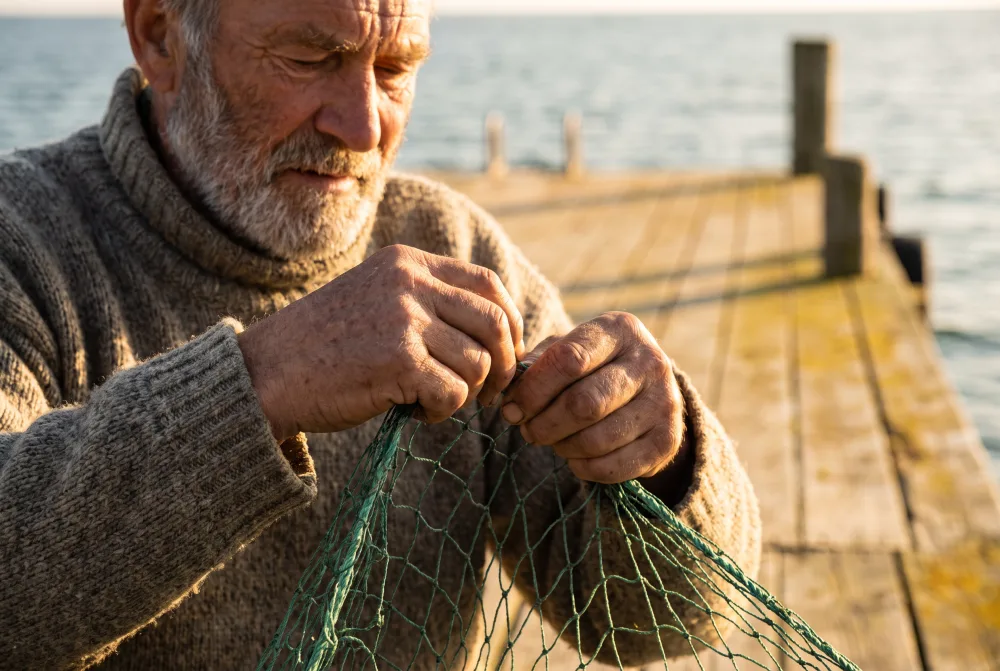
Both are strong portraits and both handled the hands well. They differ in taste. GPT Image 2 gave a dramatic, high-contrast face with very detailed beard and skin, and added a knit cap. Nano Banana Pro gave softer light and a more natural look, with the pier and sea clearly readable. Our prompt asked for sharp hands and shallow depth of field, and Pro's result matches that more closely, with a softer face and crisp hands.
One practical note: Nano Banana Pro cropped the top of the man's forehead out of the frame. GPT Image 2 kept the whole head, including the cap. If you need a safe margin, say so in the prompt.
Prompt 3: six hand-written labels
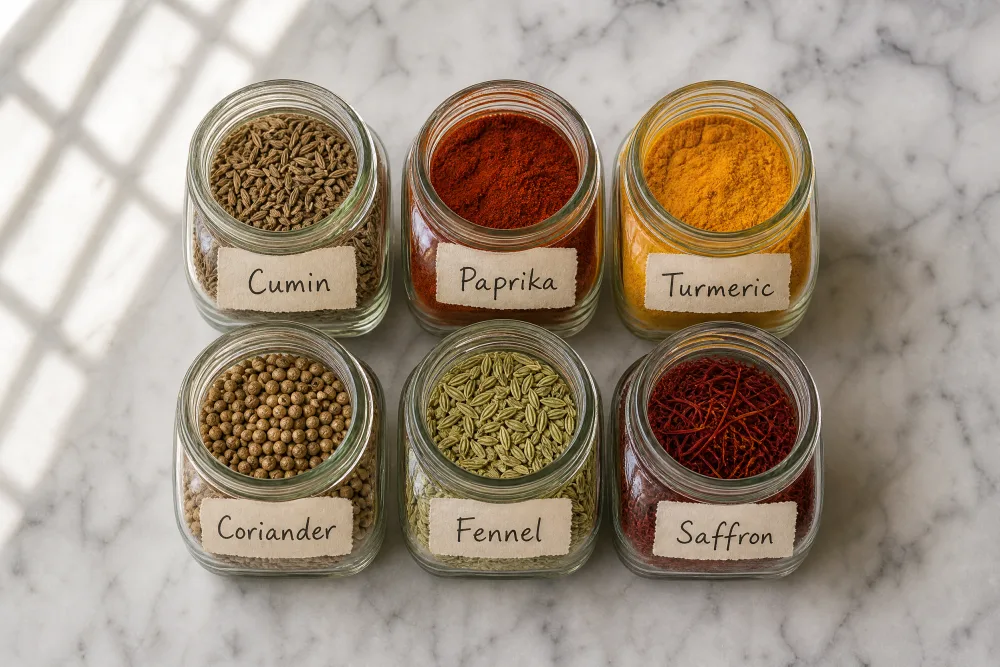
Overhead flat lay of six small glass spice jars in two rows of three on a marble counter, each jar with a handwritten paper label reading "Cumin", "Paprika", "Turmeric", "Coriander", "Fennel", "Saffron", soft window light
GPT Image 2, Medium (20 credits, 38.8 seconds):
Nano Banana Pro (45 credits, 30.7 seconds):
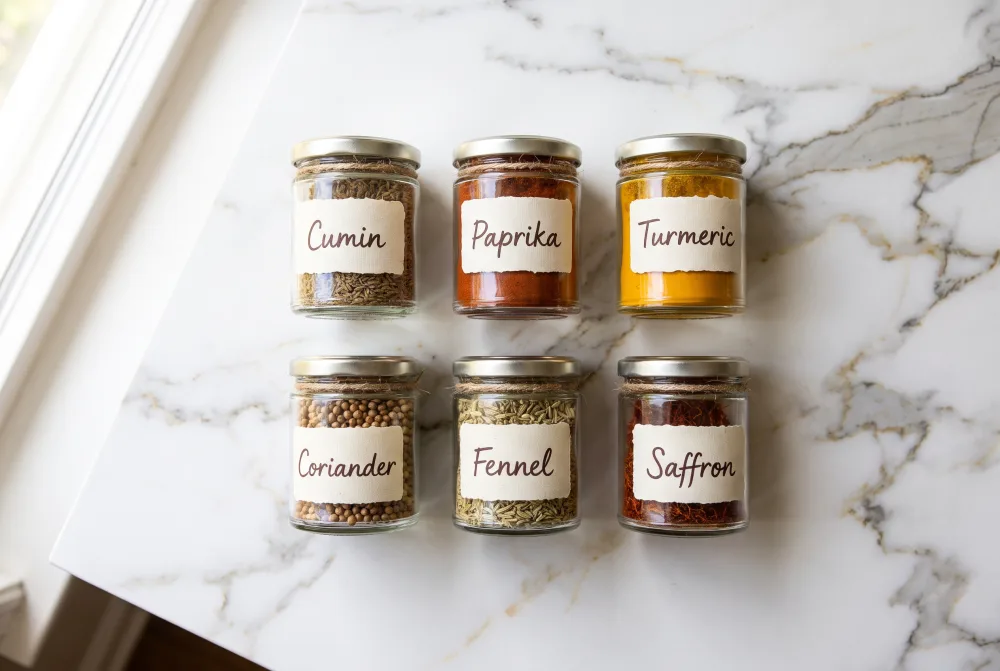
All six labels are spelled correctly on both images, and both put the jars in two rows of three. Pro's version is the tidier one: even spacing, lids with twine, a clean marble top. GPT Image 2 filled the jars more fully, so you can see the seed texture of cumin and coriander, but it left the lids off and the jars sit at slightly uneven angles.
Where each model stumbled
GPT Image 2 adds things. Column headings on the board at every tier, wall signs at High, a cap on the fisherman. None of it was in the prompt. If you work from a strict brief, name what must not appear.
Nano Banana Pro adds things too. It put a crowd and a steam locomotive behind the departure board and cropped the fisherman's forehead. Its extras lean toward atmosphere, GPT Image 2's toward structure.
High tier is expensive for what it did here. 65 credits at 2K and 120 at 4K bought a more convincing scene but no better text. We did not test whether High helps on other kinds of prompt, such as product macro shots.
This is one run per image. Eight images, three prompts, no repeats. A second run could swap any of these small differences, so use the results as a guide for where to look, not as a ranking.
Credit cost on GPT-IMG
Standard, Medium and High are GPT Image 2 tiers. Pro is Nano Banana Pro.
| Size | Standard | Medium | High | Pro |
|---|---|---|---|---|
| 1K | 10 | 20 | 65 | 45 |
| 2K | 15 | 20 | 65 | 45 |
| 4K | 25 | 30 | 120 | 90 |
Two details in this table decide how you should set things. At Medium and High, GPT Image 2 charges the same at 1K and 2K, so there is no reason to pick 1K there. Nano Banana Pro does the same, with 1K and 2K both at 45 credits. Check the live numbers on the models page before a big batch, and see pricing for credit packs.
Editing a photo works differently. GPT Image 2 takes one reference image and edit prices are higher than text-to-image, for example 15 credits at 1K Standard. Nano Banana Pro takes up to five references with no surcharge, which our Nano Banana Pro review covers in detail.
Which should you pick?
Pick GPT Image 2 if the job is text on a budget. Posters, menus, signs and labels came out correct at Standard (15 credits at 2K), and Medium at 20 credits is a comfortable final setting. Use it too when you want the quality dial: draft cheap, publish at a higher tier.
Pick Nano Banana Pro if you need the layout to follow your description closely, or you want several reference photos in one generation. It costs 45 credits regardless of tier, so keep it for the final version, not for drafts.
Use both when you are producing one hero image. Find the wording and composition on GPT Image 2 at Standard, then run the final prompt on both models at 2K and keep the better result. That is 15 credits for the draft and 65 for the two finals, 80 in all.
One more option sits between them. GPT Image 2.5 costs the same as GPT Image 2 and is newer, and our GPT Image 2.5 review and the GPT Image 2.5 vs GPT Image 2 test show where it improves. Try your own prompt on the GPT Image 2 page or the Nano Banana Pro page.
FAQ
Is GPT Image 2 better than Nano Banana Pro?
Not across the board. On our three prompts both spelled every word correctly. GPT Image 2 cost 15 to 20 credits at 2K, against 45 for Pro. Pro followed our described layout more literally. Which is better depends on whether price or layout control matters more to you.
Which is cheaper, GPT Image 2 or Nano Banana Pro?
GPT Image 2 is cheaper at Standard and Medium: 15 and 20 credits at 2K, against 45. At High it costs 65 credits at 2K and 120 at 4K, which is more than Pro's 45 and 90. Pro has no tiers, so it always costs the same.
Which is better for text in images?
Both were accurate on a dense board of cities, times and platform numbers, and on six hand-written labels. GPT Image 2 managed it at the cheapest Standard tier. The only text problems we saw were additions: column headings and wall signs we had not asked for.
Should I use the High quality tier on GPT Image 2?
Only for a final image where a richer scene matters. On our board prompt, High cost 65 credits against 15 for Standard and changed the background, not the text. Draft at Standard, then pick Medium or High for the one image you will publish.
The practical answer to GPT Image 2 vs Nano Banana Pro is to draft cheap and finish on whichever model matches your brief. Start on the text to image generator, and browse the gallery for finished examples from both.